

For many musicians, the first experience of AI music generation is simple: describe a song, add lyrics or a mood, and press create. Suno helped make that workflow familiar, but it is only one way to work with generative music. A growing set of open projects can run on a computer you control, with different models and tools for turning an idea into a track.
The choice is not simply “Suno or open source.” Hosted services make it easy to start; local workflows can offer more control over the software, files and creative process. They also ask you to handle setup, compatible hardware and model licences. Knowing that trade-off makes it easier to choose the right tool for each stage of a project.
AI music is more than a prompt box
A hosted generator is useful when you want to test a musical direction quickly. Local models open another kind of workflow: you can run generation on your own machine, connect different interfaces, and keep working with the files in your production environment. If you use a rented GPU or another cloud service, the processing is still remote, so “local-first” depends on where the model is actually running.
These tools are not all interchangeable. Some are designed around text and lyric prompts; others expose more steps for editing, arranging or transforming audio. The best comparison is practical: how much setup does the workflow require, what can you change after generation, and what permissions apply to the model and its output?
ACE-Step 1.5: an open model for a local workflow
ACE-Step 1.5 is an open music-generation project that can be run locally with a compatible setup. Its repository documents the model and ways to use it; the exact installation and hardware requirements can change between releases, so check the current instructions before planning a machine or download.
For a creator, the appeal is not just generating a song from a prompt. It is being able to build a repeatable workspace around the model: keep prompts and lyrics together, compare versions, and move from an initial idea into editing. That is where a dedicated interface can make a technical model feel more like a creative studio.
YuE2: another approach to lyrics, composition and editing
YuE and the newer YuE2 project explore a different set of workflows. The YuE2 project describes paths from lyrics and style prompts toward an editable musical score and a full song, alongside workflows for transforming or editing audio. It is a separate project with its own setup and technical requirements.
That distinction matters today: Sonora Studio currently connects to ACE-Step 1.5 through ComfyUI; it does not yet provide a YuE2 integration. YuE2 is worth exploring on its own, while Sonora is an example of how a purpose-built interface can organise a local ACE-Step workflow.
Where Sonora Studio fits
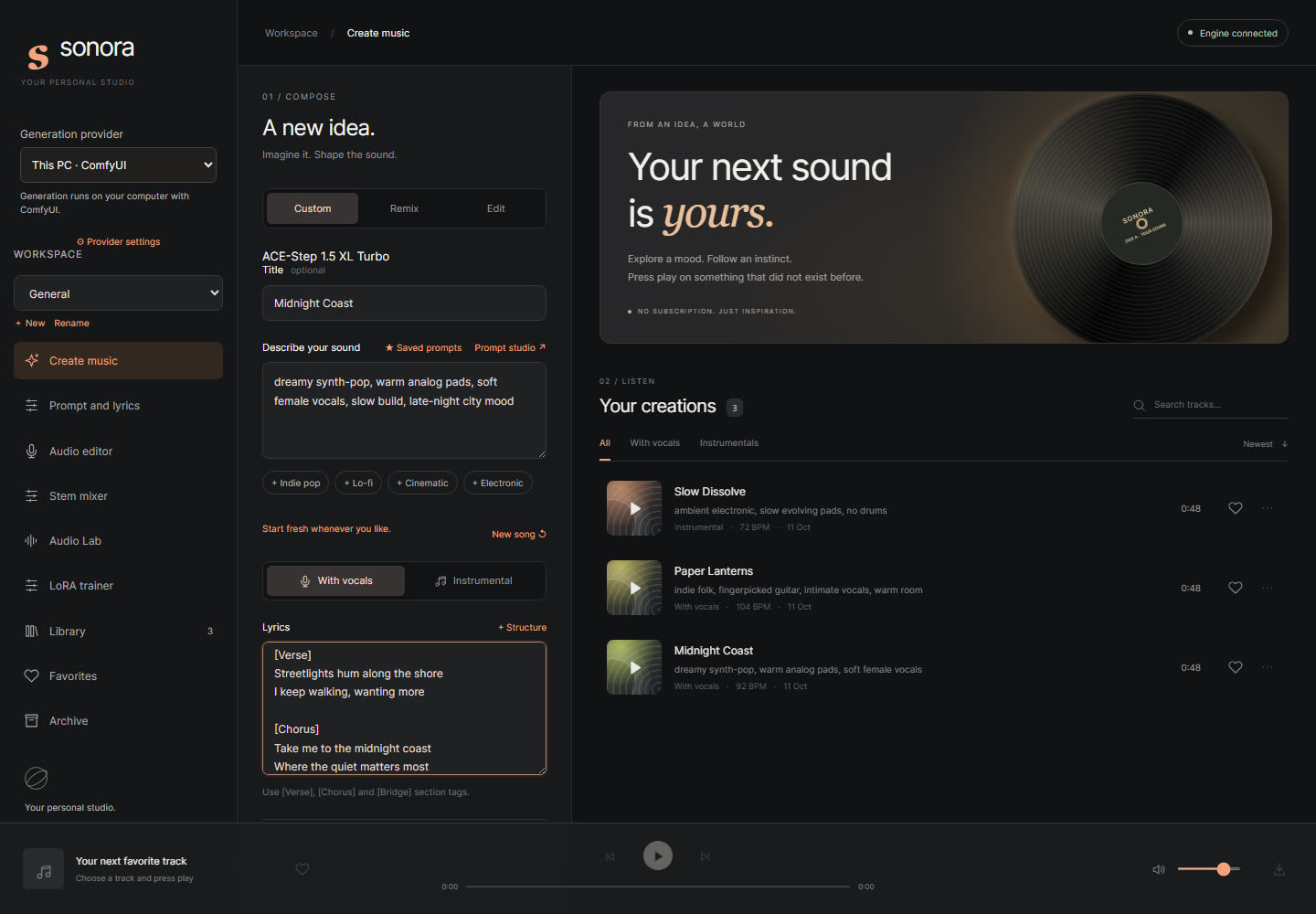
Sonora Studio is an open-source, local-first interface developed by Barbara Basso and Riccardo Abbate at Barichord, with AI-assisted coding. It is designed to give creators a more familiar place to work with ACE-Step 1.5: a prompt-and-lyrics composer, a song library, and tools for remixing and continuing the work around a generated track.
The interface is inspired by the ease of use people expect from prompt-based music platforms, while keeping the model workflow visible and configurable. Sonora is the front end, not a one-click installer: it relies on a separate ComfyUI setup and model files. Its README explains the current requirements and setup, and notes that the tracks shown in its screenshots are demo content.
“Open source” does not mean every model has the same terms
Check the licence for the interface, the model code and the model weights separately. YuE2’s repository, for example, lists Apache 2.0 for code and documentation, while its model weights have a separate CC BY-NC 4.0 licence and additional terms. The project says individual creators may monetise generated content, while companies should contact the rights holders for commercial use. Read the current terms for the specific model and release before using it in a client project or commercial production.
Running a model yourself also does not automatically make generation free: you still need suitable hardware, storage, electricity and time for setup. A hosted GPU can reduce the hardware barrier, but then the workflow is not running entirely on your own computer. Those are practical decisions, not reasons to rule out local tools.
A simple way to compare the workflows
- Start with one short musical brief and the same lyric or instrumental idea.
- Try it in a hosted generator, then explore a local model such as ACE-Step 1.5 if your setup supports it.
- Compare how much control you have over revisions, files and the next production step—not only which first result sounds best.
- Keep track of the model version and its licence before you release or monetise the result.
AI music generation is becoming a landscape of models and workflows, rather than a single app. Suno remains a convenient starting point; ACE-Step 1.5, YuE2 and other projects give curious musicians different ways to experiment. If you want to see how a local ACE-Step workflow can be organised, explore Sonora Studio on GitHub and its setup notes.